7. Click Save

Now the messaged is saved for all future emails.

 How to Create a Email Templates in Outlook Web
7. Click Save
Now the messaged is saved for all future emails.
6. Give it a title and then type what you want it to say
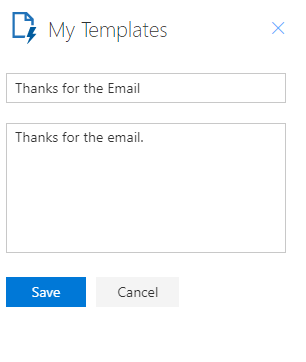
7. Click Save
Now the messaged is saved for all future emails.
6. Give it a title and then type what you want it to say
7. Click Save
Now the messaged is saved for all future emails.
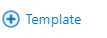
5. Click the Plus
6. Give it a title and then type what you want it to say
7. Click Save
Now the messaged is saved for all future emails.
5. Click the Plus
6. Give it a title and then type what you want it to say
7. Click Save
Now the messaged is saved for all future emails.
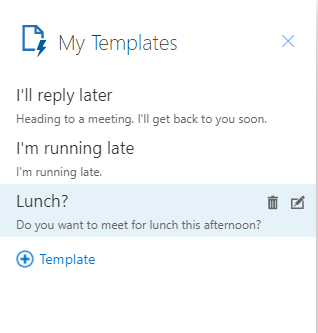
4. look for this screen
5. Click the Plus
6. Give it a title and then type what you want it to say
7. Click Save
Now the messaged is saved for all future emails.
4. look for this screen
5. Click the Plus
6. Give it a title and then type what you want it to say
7. Click Save
Now the messaged is saved for all future emails.
3. Click My Templates
4. look for this screen
5. Click the Plus
6. Give it a title and then type what you want it to say
7. Click Save
Now the messaged is saved for all future emails.

3. Click My Templates
4. look for this screen
5. Click the Plus
6. Give it a title and then type what you want it to say
7. Click Save
Now the messaged is saved for all future emails.
2.Click the 3 dots near the bottom middle of the window.
3. Click My Templates
4. look for this screen
5. Click the Plus
6. Give it a title and then type what you want it to say
7. Click Save
Now the messaged is saved for all future emails.
2.Click the 3 dots near the bottom middle of the window.
3. Click My Templates
4. look for this screen
5. Click the Plus
6. Give it a title and then type what you want it to say
7. Click Save
Now the messaged is saved for all future emails.
1.Click New message
2.Click the 3 dots near the bottom middle of the window.
3. Click My Templates
4. look for this screen
5. Click the Plus
6. Give it a title and then type what you want it to say
7. Click Save
Now the messaged is saved for all future emails.
1.Click New message
2.Click the 3 dots near the bottom middle of the window.
3. Click My Templates
4. look for this screen
5. Click the Plus
6. Give it a title and then type what you want it to say
7. Click Save
Now the messaged is saved for all future emails.
1.Click New message
2.Click the 3 dots near the bottom middle of the window.
3. Click My Templates
4. look for this screen
5. Click the Plus
6. Give it a title and then type what you want it to say
7. Click Save
Now the messaged is saved for all future emails.
1.Click New message
2.Click the 3 dots near the bottom middle of the window.
3. Click My Templates
4. look for this screen
5. Click the Plus
6. Give it a title and then type what you want it to say
7. Click Save
Now the messaged is saved for all future emails.

















