
Tech Hub

How to clear your History/Cache/Cookies on Chrome
Chrome / EdgeHow to clear your History/Cache/Cookies on Chrome

Clear Browsing Data in Google Chrome

  1. Open Google Chrome
    Press the three dots in the top right corner (under the X).
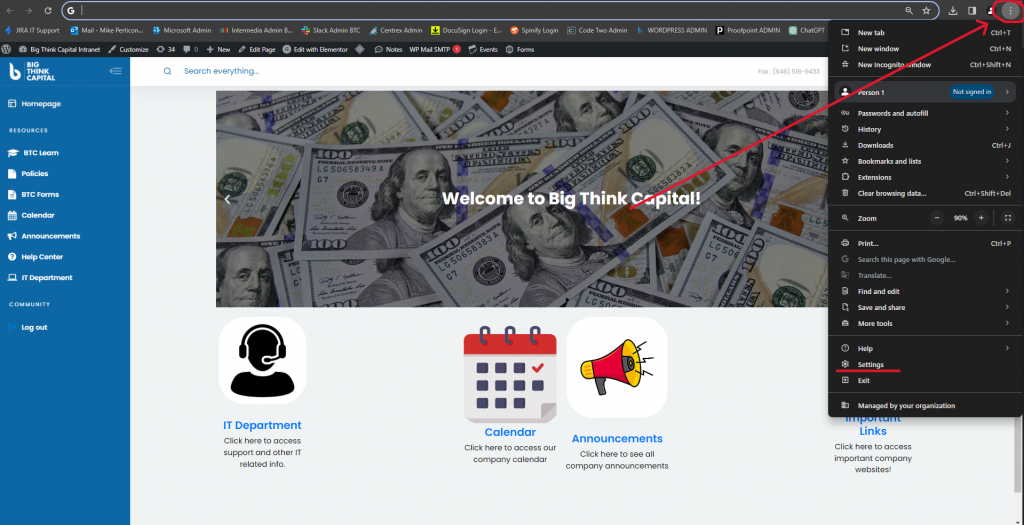
    Chrome menu location
  2. Go to Privacy and Security
    Then press “Privacy and Security” and select “Clear Browsing Data.”
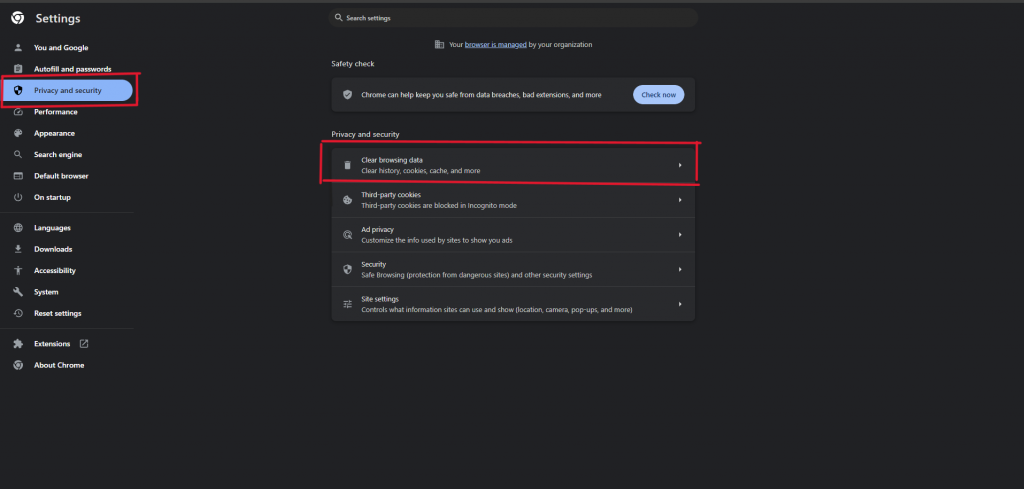
    Privacy and Security settings in Chrome
  3. Choose Your Time Range
    In the dialog box that appears, select the time range for which you want to clear data. You can choose “All time” to delete everything.
  4. Select Data to Clear
    Check the boxes next to:
    • Browsing history: Removes the list of websites you’ve visited.
    • Cookies and other site data: Deletes saved information from websites, like logins and preferences.
    • Cached images and files: Clears stored copies of website images and files to free up space and potentially fix issues.
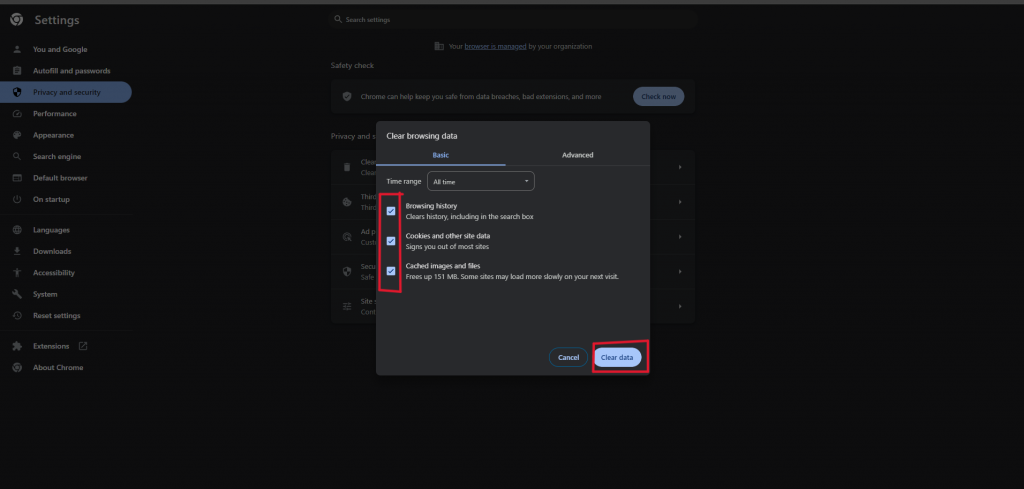
    Clear browsing data dialog in Chrome

    Note: Checking these boxes helps with privacy, security, and troubleshooting, but it might log you out of some sites temporarily and slow down loading times until new data is downloaded.

  5. Clear Data
    Click on the “Clear data” button to finish.

About This Page

The Tech Hub is your go-to resource for IT support and tool training. Find how-to guides, troubleshooting tips, and best practices for platforms like Outlook, Teams, OneDrive, Calendly, and more.

Can’t Find What You’re Looking For?

If you still need help or can’t locate the info you need, submit an IT support ticket and we’ll get back to you as soon as possible.

What’s New

Record-Breaking Summer at Big Think Capital 🌟
This August, Big Think Capital hit a new milestone — funding 1,075 deals totaling $32.56M. A record-breaking summer powered by teamwork, momentum, and dedication. 💪🌟
🎲 Win Your Way to Vegas! 🎲
🔥 The road to Vegas starts now! From 9/5–10/17, each sales team battles head-to-head — and the top performer from every team wins a spot to represent BTC at the B2B Finance Expo in Las Vegas. Outperform. Outshine. Vegas is the prize. 🎲✨
🏆 Introducing the Legends Club 🏆
🏆 The Legends Club celebrates agents who achieve extraordinary results, with exclusive perks like your portrait on the Legends Wall, custom gear, and annual outings. Greatness starts here.
Welcome our New Team Member: Scott Smith
🚀 Excited to welcome Scott Smith as our newest Funding Associate! With a background as a pro athlete, entrepreneur, and Johns Hopkins graduate, Scott brings energy and expertise to help businesses thrive.
Big Think Capital Launches President’s Club — Celebrate Excellence with a Tropical Getaway
The President’s Club is Big Think Capital’s newest recognition program, honoring our top performers with an exclusive tropical getaway this January. Club members earn their spot by surpassing ambitious goals, driving company success, and embodying excellence every day. This is more than a trip — it’s a celebration of hard work, teamwork, and achievement.

Quick Launch

Quote of the Day
















